
Salesforce Connection Settings
Overview
This screen is used to configure the settings for connecting SDI to Salesforce. By selecting the connection destination (Location/Data Type) and registering the necessary authentication information (Auth Domain, API Version, and input items for each authentication method), SDI can execute data acquisition and updates through the Salesforce API.
Settings

| No | Item | Description |
|---|---|---|
| 1 | Location | Select SaaS. |
| 2 | Data Type | Select Salesforce. |
| 3 | Auth domain | Specify the domain used for Salesforce login/authentication. ・Standard (Production): login.salesforce.com ・Sandbox: test.salesforce.com ・Custom Domain (My Domain): Specify the login domain configured in your Salesforce organization. Example: If the URL is https://MyDomainName.my.salesforce.com, enter MyDomainName.my.salesforce.com.※Do not include schemes like https://; enter only the domain name (hostname). |
| 4 | API Version | Specify the Salesforce API version to be used for the connection. Normally, the default value is fine. Change the version only if required by Salesforce specifications or specific functional requirements. |
JWT Bearer Token (Private PEM) Authentication
Signs a JWT using a private key (PEM) to obtain an access token by impersonating a user. This method is suitable for server-to-server integration (no User ID/Password required).
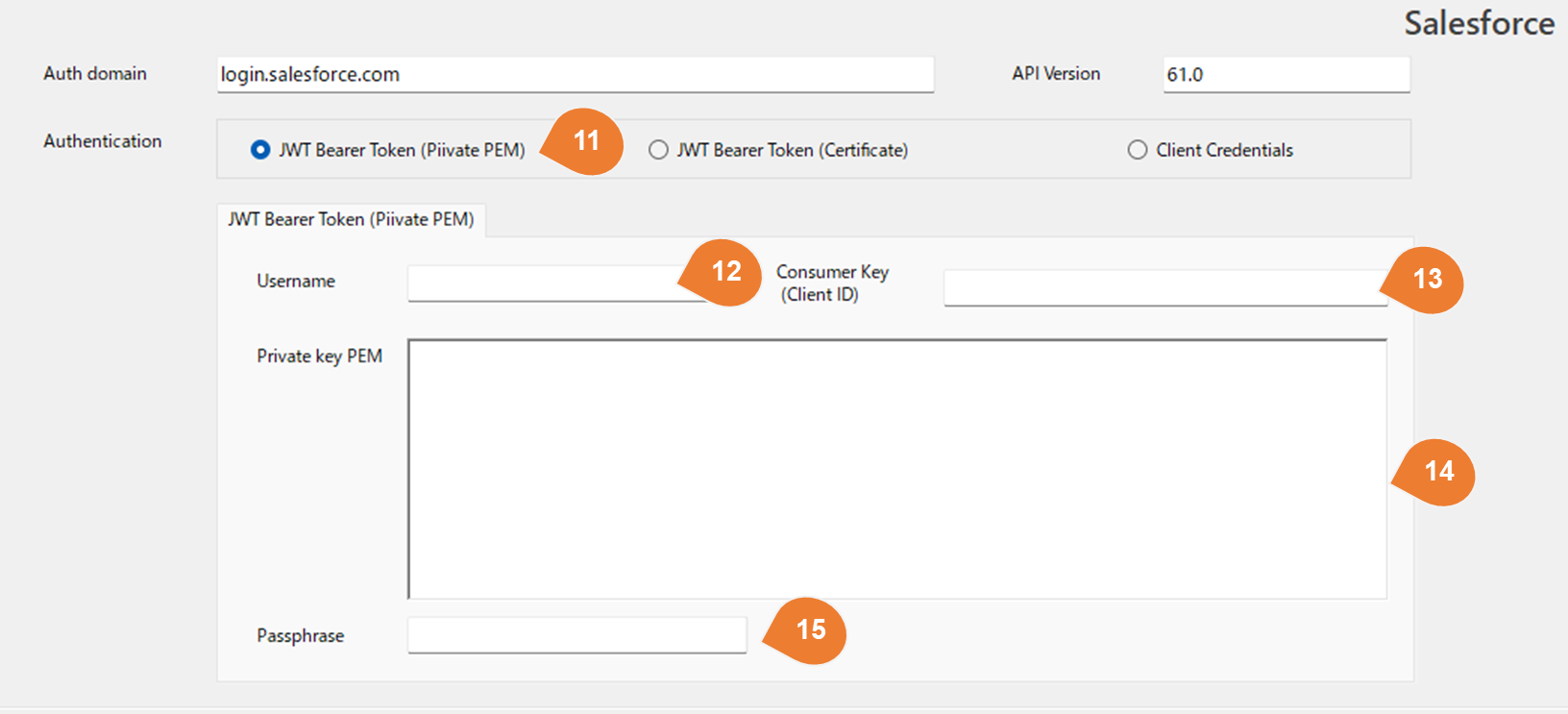
| No | Item | Description |
|---|---|---|
| 11 | Authentication | Select JWT Bearer Token (Private PEM). ※You must create a Connected App in Salesforce and register a public key certificate in advance. |
| 12 | Username | Enter the Salesforce username to be impersonated for JWT authentication. Example: user@example.com ※API access will be performed within the scope of the permissions (Profile/Permission Sets) granted to this user. |
| 13 | Consumer Key (Client ID) | Enter the Consumer Key (= Client ID) of the Connected App created in Salesforce. Used to identify the application for which the JWT is issued. |
| 14 | Private key PEM | Paste the Private Key (PEM format) used to sign the JWT. Specify the private key that pairs with the public key certificate registered in the Salesforce Connected App. ※The private key is stored encrypted. |
| 15 | Passphrase | Enter this if the private key (PEM) is passphrase-protected (encrypted). Leave blank if using a PEM without a passphrase. |
JWT Bearer Token (Certificate) Authentication
An authentication method that signs a JWT using a certificate file (.pfx / .p12 / .crt) to obtain a Salesforce access token. This method is suitable for server-to-server integration as it does not use a User ID/Password.
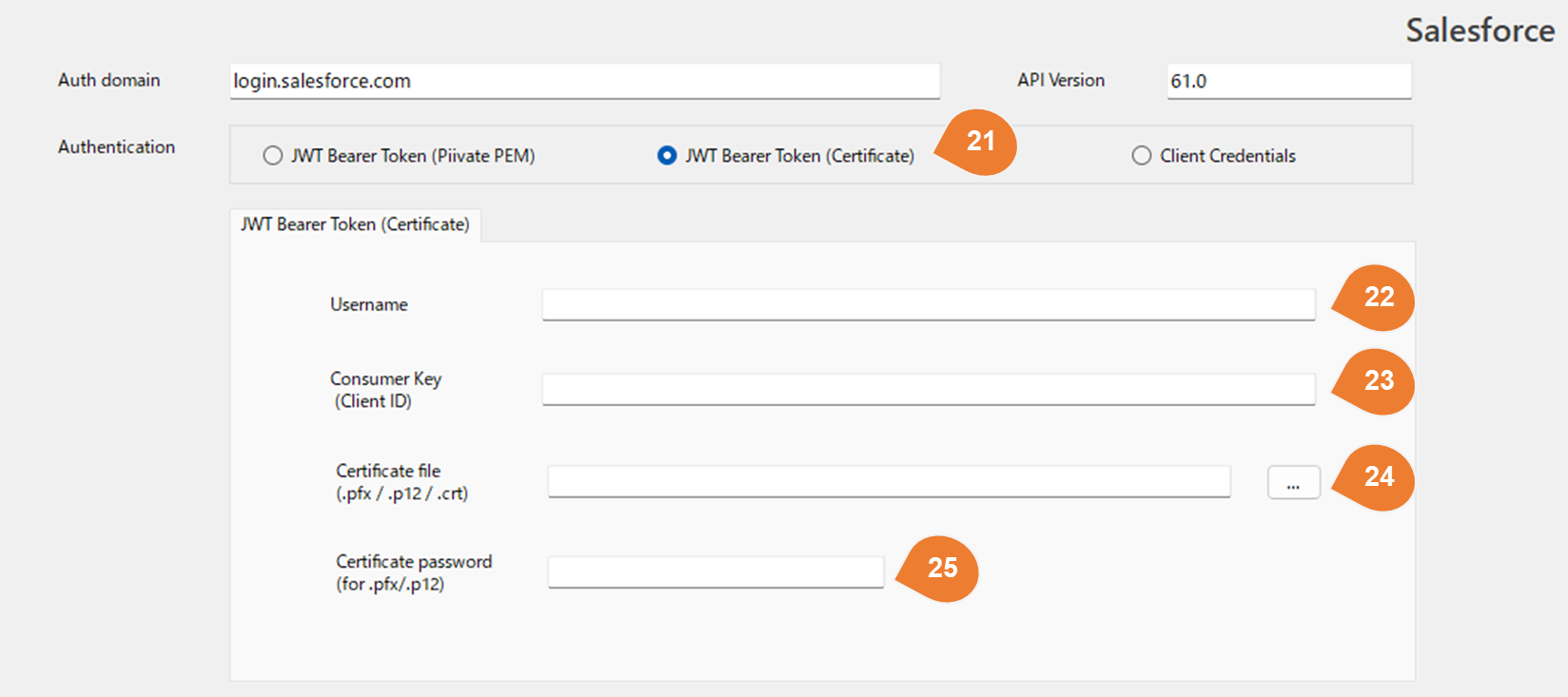
| No | Item | Description |
|---|---|---|
| 21 | Authentication | Select JWT Bearer Token (Certificate). ※You must create a Connected App in Salesforce and register a public key certificate in advance. |
| 22 | Username | Enter the Salesforce username to be impersonated for JWT authentication. Example: user@example.com ※API access will be performed within the scope of the permissions (Profile/Permission Sets) granted to this user. |
| 23 | Consumer Key (Client ID) | Enter the Consumer Key (= Client ID) of the Connected App created in Salesforce. Used to identify the application for which the JWT is issued. |
| 24 | Certificate file (.pfx / .p12 / .crt) | Specify the certificate file used for JWT signing. ・ .pfx / .p12: Certificate containing a private key (normally used). ・ .crt: Public key certificate only (may not be usable for JWT signing depending on the environment if the private key is missing). ※The corresponding Public Key Certificate must be registered in the Salesforce Connected App. |
| 25 | Certificate password (for .pfx/.p12) | Enter the password set for the certificate file (.pfx/.p12). Leave blank if the certificate has no password. |
Client Credentials Flow Authentication
Obtains an access token as the application (client) itself to access the Salesforce API. ※This flow must be permitted/enabled on the Salesforce side.
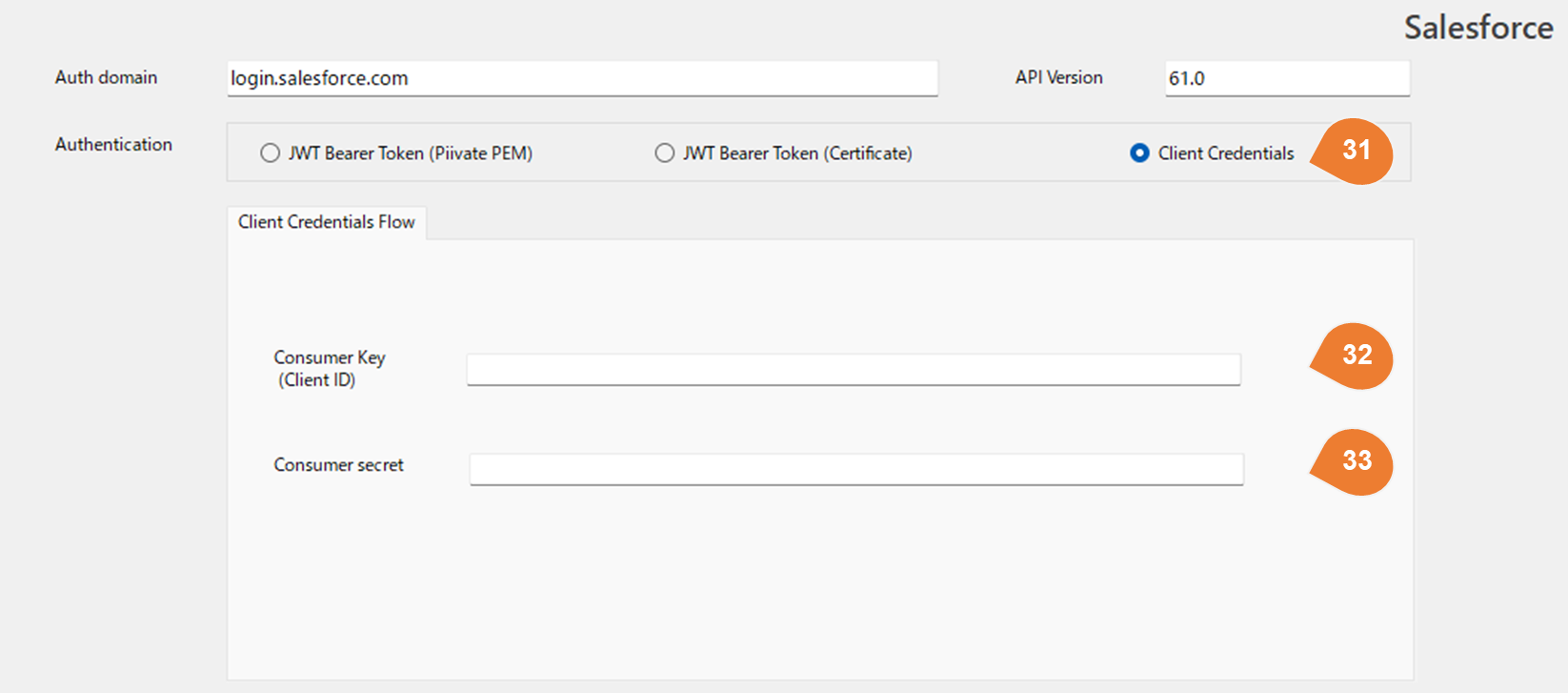
| No | Item | Description |
|---|---|---|
| 31 | Authentication | Select Client Credentials. ※This flow must be permitted/enabled within the Salesforce organization settings. |
| 32 | Consumer Key (Client ID) | Enter the Consumer Key (= Client ID) of the Connected App created in Salesforce. Used to identify the application to be authenticated. |
| 33 | Consumer secret | Enter the Consumer Secret (= Client Secret) of the Connected App. Used in combination with the Client ID to authenticate and obtain an access token. |